DHCP Option 82 Explained: Circuit ID, Remote ID & Examples
Learn how DHCP Option 82 works, including Circuit ID, Remote ID, DHCP relay behavior, packet examples, troubleshooting, and an Option 82 decoder.
DHCP Option 82 Builder / Decoder
Inspect generic suboption bytes or build an RFC-style Option 82 TLV from values you already know.
Privacy: processing happens in this browser. Values are not sent to IT Dock or third parties, saved, added to the URL, or included in analytics.
Paste the complete DHCP option TLV or only its suboption payload. Hex byte separators are optional. You may also enter one structured field per line, such as circuit-id=VLAN-42/port-1/4 or remote-id-hex=53 57 2D 30 31.
Quick Summary
- Option 82 is a relay-agent information container added to forwarded DHCP requests; it is not a universal client identity or address.
- Suboption 1 is Circuit ID and suboption 2 is Remote ID. Both contain relay-supplied bytes, and their meanings are implementation-specific.
- A DHCP server may use these values for exact-match policies. RFC 3046 says servers should treat them as opaque rather than parse them.
- A relay agent removes the echoed Option 82 before delivering a server reply to the client.
- The builder and decoder operate locally in your browser and never submit, store, or track the entered identifiers.
Table of Contents
- 1.What Is DHCP Option 82?
- 2.Why Relay Agents Add Option 82
- 3.DHCP Option 82 Packet Structure
- 4.Circuit ID vs Remote ID
- 5.A Readable Option 82 Example
- 6.How DHCP Servers Use Option 82
- 7.Campus and ISP Use Cases
- 8.Relay Behavior, DHCP Snooping, and Cisco Notes
- 9.Troubleshooting Option 82
- 10.When to Enable or Disable Option 82
- 11.Security and Trust Boundaries
- 12.Frequently Asked Questions
- 13.Standards and Vendor References
DHCP Option 82 is the Relay Agent Information option. It lets a DHCP relay attach context about where a request arrived before forwarding it to a DHCP server. A server can use that context in a policy, but the byte values are configured by the relay—not assigned a universal meaning by the protocol. The option is defined in RFC 3046.
The practical distinction is simple: the DHCP packet carries a standard container, while the relay vendor, network operator, and server policy determine what the identifiers inside it mean. This guide walks through the fields and relay behavior, then shows where to verify the exact format in a real network.
What Is DHCP Option 82?
A DHCP client typically broadcasts a request on its local link. A router or Layer 3 switch acting as a relay forwards it toward a server. The relay can add Option 82 to that forwarded request so the server sees information about the client-facing circuit in addition to ordinary DHCP fields such as the relay address (`giaddr`).
Option 82 is not an IP address, lease, authentication token, or universally formatted hostname. It is a container of one or more relay-agent suboptions. Circuit ID and Remote ID are the most familiar fields, but other registered suboptions exist. Check the IANA DHCP parameter registry rather than assuming every relay-agent field is one of those two.
Why Relay Agents Add Option 82
The ordinary relay address can identify a relay or help select a subnet, but it may not distinguish several access circuits behind the same relay. Option 82 gives a capable DHCP server more context for selecting a scope or applying a policy. For example, an organization might map an exact Circuit ID to a site or access port and use that mapping to assign a reserved address pool.
That is a configured relationship, not something inferred from the name of a field. If a policy expects site-a/closet-2/port-14, the relay must actually send those bytes and the server must match the value as configured. A value that merely looks like a VLAN or interface to a human is not guaranteed to be interpreted that way by the server.
DHCP Option 82 Packet Structure
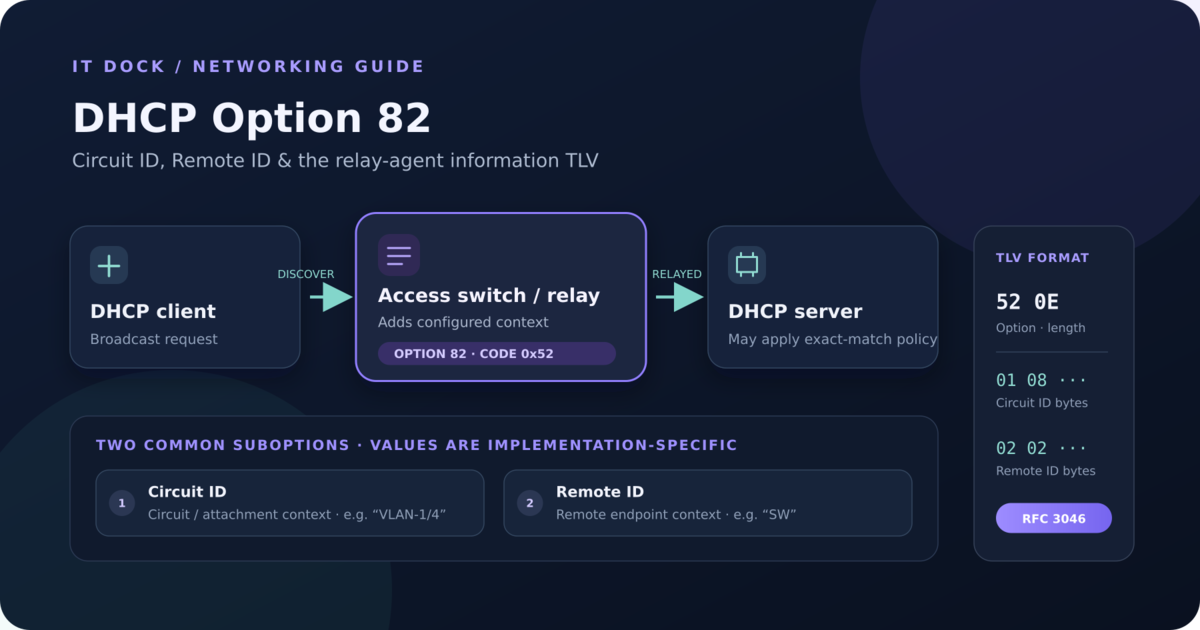
DHCP options use a one-byte option code and a one-byte length followed by that many value bytes. The decimal option code is 82 (hex 0x52). Its value is itself a sequence of suboptions, each with its own one-byte code, one-byte length, and value bytes:
Option 82:  [82] [outer length]
Value:      [suboption code] [suboption length] [suboption bytes]
            [suboption code] [suboption length] [suboption bytes] ...
The outer length covers the complete suboption sequence. Each suboption length counts only that suboption's value bytes—not its two-byte header. Because DHCP option length is one byte, the Option 82 value can contain at most 255 bytes. A malformed or truncated length means a decoder cannot safely locate subsequent fields.
Suboption code 1 is Circuit ID and code 2 is Remote ID. Keep unknown codes in the packet capture: an unknown suboption may be important to the relay/server even when a generic decoder cannot explain its contents.
Circuit ID vs Remote ID
Circuit ID — suboption 1
Circuit ID identifies the access circuit on which the relay received the request. A configured value could represent a VLAN, switch port, logical interface, slot/port, bridge, or another local attachment. RFC 3046 recommends the server treat it as an opaque value and match it exactly, rather than parse an assumed delimiter or vendor format.
Remote ID — suboption 2
Remote ID identifies the remote endpoint according to the relay's implementation. It might represent a switch or relay, subscriber device, access point, modem, MAC address, hostname, or another endpoint identifier when that value is chosen by the platform or operator. RFC 3046 says Remote ID should be globally unique, but does not standardize a universal string or byte layout for it.
Printable bytes may look like ASCII, while other values are binary. A switch MAC address might appear as six bytes or as text with separators; a vendor could also encode proprietary components. Never treat something as a MAC address—or strip punctuation, split fields, or change case—without confirming the platform documentation and server policy.
A Readable Option 82 Example
This conceptual example uses fictional values. It is a valid generic TLV shape, not a default format for any relay product:
Client
  → access switch / DHCP relay
      adds Option 82 to the forwarded request
  → DHCP server
      matches the exact relay-supplied values to a configured policy
  → reply returns through the relay, which removes Option 82 before forwarding to the client

Complete Option 82 bytes:
52 0E 01 08 56 4C 41 4E 2D 31 2F 34 02 02 53 57

52       option code 82
0E       outer value length = 14 bytes
01 08    suboption 1, Circuit ID; 8 value bytes follow
...      56 4C 41 4E 2D 31 2F 34 = ASCII "VLAN-1/4"
02 02    suboption 2, Remote ID; 2 value bytes follow
...      53 57 = ASCII "SW"
In this example only, the relay chose the text VLAN-1/4 for Circuit ID and SW for Remote ID. The exact capitalization and separators are just sample bytes. A different product—or a different configuration on the same product—may send a different representation.
How DHCP Servers Use Option 82
A DHCP server that supports relay-agent information can use Circuit ID, Remote ID, and other suboptions as inputs to policy. A rule might select a lease scope, address range, options, or class based on a relay value. For example, Microsoft DHCP policy documentation describes policy conditions that can use relay-agent information. The rule must match what the actual relay sends; do not copy a sample value into production without capturing and checking the packet.
RFC 3046 advises servers to treat Circuit ID and Remote ID as opaque, exact-match values. This is useful operationally: an administrator can map a byte sequence to a friendly label in the DHCP configuration without assuming every relay encodes a VLAN in the same position. If the server does not recognize Option 82, RFC 3046 says it ignores the option and does not echo it. The regular DHCP request may still receive a response, but an Option-82-dependent policy will not be applied.
Campus and ISP Use Cases
Campus and enterprise networks
A campus relay may use Circuit ID to distinguish access ports or logical circuits that share an upstream relay interface. If those values are stable and controlled, a DHCP policy can assign addresses or options according to an administrator-maintained mapping. VLAN and port information is available only if the relay actually includes it in the value.
ISPs and service-provider access
A provider may use Remote ID or Circuit ID to associate a request with a subscriber line or access device. This can support per-subscriber lease handling or selection of a customer-specific network profile. The provider must document how those values are provisioned and how the DHCP server matches them; a generic decoder cannot recover business meaning from an undocumented byte string.
For related address planning, see the VLAN/Subnet Planner and Network Diagram Generator. For DHCP documentation and client records, IT Dock also has a DHCP documentation template.
Relay Behavior, DHCP Snooping, and Cisco Notes
In the RFC 3046 flow, a relay that forwards a client request can add relay-agent information. A DHCP server that supports the option echoes it in the reply. The relay—or a trusted downstream network element—removes the information before the reply reaches the client. A relay that receives a packet with nonzero giaddr should not add another Option 82 as if it were the original access relay. Relay-chain details still depend on the actual network design.
DHCP snooping adds a switch trust boundary: access switches may track DHCP messages and relay information, reject server messages on untrusted interfaces, or insert/validate Option 82 according to platform settings. On Cisco Catalyst platforms, the DHCP Snooping configuration guide documents Option 82 controls; Cisco's troubleshooting guidance also calls out snooping trust and Option 82 handling as causes of dropped DHCP traffic. Those are Cisco-specific controls, not universal switch defaults.
Cisco Catalyst IOS XE examples documented for specific platforms/releases:
  ip dhcp snooping information option
  no ip dhcp snooping information option
  ip dhcp snooping information option allow-untrusted

These are platform-specific command examples, not a universal configuration recipe.Troubleshooting Option 82
DHCP stopped working after Option 82 was enabled
- Capture the client-facing and relay-to-server exchanges. Compare giaddr, Option 82, outer length, and every suboption length.
- Check whether the server accepts relay-agent information and whether a policy now matches a different scope or denies a request.
- Inspect snooping trust on the client access, relay, uplink, and server-facing interfaces. Verify the platform's documented handling of pre-existing Option 82.
- Confirm whether the server echoes the option and whether the relay accepts a reply that does not contain the echo.
The server rejects packets containing Option 82
Check server logs and policy conditions first. A server could reject a request due to its own policy or implementation; this is different from the RFC behavior of a server that is simply unaware of Option 82. Confirm whether a configured relay-agent policy or class expects a different Circuit ID, Remote ID, or relay address.
The Circuit ID or Remote ID is unexpected
Decode the raw bytes, then compare them with the relay's configured format and interface/VLAN state. Look for changes in capitalization, separators, binary encoding, port numbering, or leading bytes. Do not “correct” the value by editing a server policy until you know whether the relay output changed or the capture contains a different path.
Duplicate, malformed, or uncleared relay information
Check for a second relay or snooping switch that is seeing an already-relayed packet, and inspect the complete option list for a duplicated outer option or invalid nested lengths. RFC 3046 defines relay handling for packets containing existing agent information; the exact drops/rewrite behavior also depends on trust settings and the vendor implementation. On replies, verify that the relay or trusted downstream element removes the echoed information before it reaches the client.
Server does not support Option 82
The ordinary DHCP exchange may continue without Option-82-based policy. Verify from a packet capture and server documentation whether the field is ignored, echoed, or causes a product-specific rejection. If the relay or access design depends on an echo, test its documented response to the missing field before changing the production configuration.
The local helper above checks generic TLV lengths, preserves unknown suboptions, and shows printable ASCII alongside hex. It deliberately does not label a vendor-specific byte sequence as a port, VLAN, MAC address, or subscriber ID.
When to Enable or Disable Option 82
Enable relay-agent information when the relay is the trusted source for useful circuit context, the DHCP server can consume it as intended, and the operational team can verify the relay/server policy path. Keep the values stable and documented so a port move or software change does not silently alter a server match.
Consider disabling or changing insertion only when the configured network design does not use the information, the server/relay combination cannot handle it, or a specific trust/configuration issue has been confirmed. Make the change at the narrowest scope, understand any policy that depends on the current value, and verify client renewals after the change. Disabling snooping or relay checks broadly can remove a protection boundary as well as restore one DHCP path.
Security and Trust Boundaries
Option 82 is not cryptographically authenticated. A Circuit ID that says “trusted-port” does not prove that a trusted relay inserted it. Protect the path between the access network, relay, and DHCP server; configure switch trust boundaries deliberately; and follow platform guidance for packets carrying pre-existing relay-agent information.
Treat the server's Option 82 policy as a network control input, not as independent identity verification. If a value selects a privileged address range or critical DHCP options, verify the insertion point, access port behavior, and server-side exact match. Include Option 82 changes in switch and DHCP documentation so a later port/VLAN change does not become a difficult-to-trace lease incident.
Frequently Asked Questions
What is DHCP Option 82?
DHCP Option 82 is the Relay Agent Information option defined by RFC 3046. A DHCP relay agent can attach it to a client request it forwards to a DHCP server so the server can receive network-side context such as Circuit ID and Remote ID.
What is the difference between Circuit ID and Remote ID?
Circuit ID is an identifier for the circuit or attachment where the relay received a request. Remote ID identifies the remote endpoint or subscriber according to the relay's implementation. Their byte formats are not universal.
Are Circuit ID and Remote ID formats standardized?
The suboption codes and TLV structure are standardized, but the values inside the fields are generally implementation-specific. RFC 3046 recommends that DHCP servers treat Circuit ID and Remote ID as opaque values rather than parse their internal format.
Does a DHCP client send Option 82?
Normally the relay agent adds Option 82 as it forwards a client-originated request. Relay and switch trust settings determine what happens if an incoming packet already contains relay-agent information; the option itself is not proof that a trusted relay created it.
What if the DHCP server does not support Option 82?
RFC 3046 says a server unaware of the option ignores it and does not echo it. The server can still process the ordinary DHCP request, but policies that depend on Option 82 will not be applied. Confirm how the relay handles a reply without the echoed field.
Does Option 82 identify a VLAN or switch port?
It can, if the relay's configured Circuit ID encodes that information. RFC 3046 defines Circuit ID as an agent-local opaque identifier; it does not prescribe a universal VLAN, interface, slot/port, or delimiter format.
Is the Remote ID always a switch MAC address?
No. RFC 3046 requires a globally unique Remote ID but does not define one universal value. Depending on platform and configuration, it may be a switch or relay identifier, subscriber device, MAC address, hostname, or another device identifier.
Can I decode any vendor's Option 82 value with the helper?
The helper can validate the TLV boundaries, show suboption codes and lengths, and display printable ASCII when the bytes allow it. It does not infer vendor semantics; compare the bytes with the documentation and configuration for the exact relay platform and software release.
Standards and Vendor References
Prefer the standard and the documentation for the exact switch/relay and DHCP-server release in your environment. These references support the protocol and vendor-specific notes in this guide:
- RFC 3046 — DHCP Relay Agent Information Option
- IANA — BOOTP and DHCP Parameters Registry
- Microsoft Learn — DHCP Policies
- Cisco Catalyst 9500 IOS XE 17.12 — Configuring DHCP
- Cisco — Troubleshoot DHCP Snooping
Related DHCP and Network Tools
If you are troubleshooting neighboring DHCP options or recording the network around the relay, these IT Dock resources may help: